Kafka Schema Registry
Dataset mappings
Overview
Lineage metadata is defined directly within your source schemas. Additional fields on the schema annotate both the dataset itself and individual fields for column-level lineage.
You are free to structure this metadata using whatever conventions make sense for your organization.
Factor Platform uses kJQ expressions to map your annotated schema metadata to valid OpenLineage Dataset facets.
Customers define a dataset mapping configuration that tells Factor Platform how to extract and transform this metadata to lineage facets.
Mappings are specified per schema type (e.g. Avro or JSON Schema) at the Schema Registry level, so all schemas within a single registry must follow the same annotation structure for lineage extraction to succeed.
Mappings can be defined through the UI via a wizard, or through the API. Once configured, Factor Platform will evaluate them on each schema observation cycle (approximately every minute) and:
- Produce a OpenLineage-conforming Dataset describing each schema
- Report any dataset quality issues such as malformed or null mappings, missing fields, etc.
Datasets are versioned. When dataset mappings or the schema version changes, the dataset version will also increment.
Factor Platform's UI and API allow you to see the full history of dataset changes over time. For example, when a new tag was added or an owner was removed.
kJQ expressions
Dataset mappings leverage the full power of kJQ, enabling both simple field extraction and more complex transformations.
For example: .meta.data_tier | contains("tier-1", "tier-2", "tier-3") extracts the data_tier field and validates that its value is one of the allowed options.
See the kJQ reference manual for complete language documentation.
Supported schema types
- AVRO
- JSON Schema
- Protobuf (coming soon)
Mapping structure
Each mapping consists of two parts:
- Expression: a kJQ expression that extracts data from the schema (e.g.
.data_catalog.tags) - Operation: the facet operation to apply to the extracted value (e.g.
add_tags,add_documentation)
Mappings operate at two levels:
- Dataset level (
mappings): extract metadata that describes the dataset as a whole, such as ownership, tags, documentation, and domain. - Column level (
column_mappings): optionally extract metadata for individual fields within the schema, such as PII flags or field descriptions.
Example
The following example demonstrates dataset mappings for an Avro schema that embeds lineage metadata under a data_catalog field at both the dataset and field level. In this schema, certain fields are flagged as containing PII (data_catalog.pii), allowing Factor Platform to surface this information when browsing schemas.
Avro schema
{
  "type": "record",
  "name": "CustomerEvent",
  "namespace": "com.acme.events",
  "data_catalog": {
    "description": "Customer lifecycle events captured from the CRM system",
    "owner": "data-platform@acme.com",
    "domain": "customer",
    "doc_link": "https://wiki.acme.com/schemas/customer-event",
    "tags": ["gdpr-regulated", "tier-1"]
  },
  "fields": [
    {
      "name": "customer_id",
      "type": "string",
      "data_catalog": {
        "description": "Unique customer identifier",
        "pii": false
      }
    },
    {
      "name": "email",
      "type": "string",
      "data_catalog": {
        "description": "Primary email address",
        "pii": true,
        "classification": "contact-info"
      }
    },
    {
      "name": "event_type",
      "type": "string",
      "data_catalog": {
        "description": "Type of lifecycle event",
        "pii": false
      }
    },
    {
      "name": "date_of_birth",
      "type": "string",
      "data_catalog": {
        "description": "Customer date of birth in ISO 8601 format",
        "pii": true,
        "classification": "demographic"
      }
    }
  ]
}
Mappings definition
{
  "mappings": {
    "ops": {
      "add_ownership": {
        "expression": ".data_catalog.owner",
        "is_required": true
      },
      "add_tags": {
        "expression": ".data_catalog.tags",
        "is_required": true
      },
      "add_documentation": {
        "expression": ".data_catalog.description",
        "is_required": true
      },
      "add_resources": {
        "expression": ".data_catalog.doc_link",
        "is_required": false
      }
    },
    "custom_tags": [
      {
        "key": "Domain",
        "expression": ".data_catalog.domain",
        "is_required": true
      }
    ]
  },
  "column_mappings": {
    "custom_tags": [
      {
        "key": "Description",
        "expression": ".data_catalog.description",
        "is_required": true
      },
      {
        "key": "PII",
        "expression": ".data_catalog.pii",
        "is_required": true
      },
      {
        "key": "Classification",
        "expression": ".data_catalog.classification",
        "is_required": false
      }
    ]
  }
}
Facets
The following section documents all Dataset facets that Factor Platform supports and the shape of data we expect for each operation type.
Catalog
- Reference: OpenLineage spec
- Operations:
add_metadata_uri
Note: The Catalog facet is implicitly mapped based on the context of your schema, no mappings are required.
| Field | Value |
|---|---|
framework | schema-registry |
type | confluent or glue |
name | The name of the subject |
namespace | The namespace of the subject (the Schema Registry ID) |
source | kafka |
Tags
- Reference: OpenLineage spec
Use to attach custom key-value tags so downstream tools can filter, group, or enrich lineage.
Example mappings
- kJQ mapping:
.meta.tags - Schema:
{"namespace": "example.avro",
 "type": "record",
 "name": "User",
 "meta": {"tags": ["pii"]}}
- Output:
{"tags": [{"key": "pii", "value": "true", "source": "SCHEMA"}]}
Note: for tags with richer key-value pairs use custom mappings.
Ownership
- Reference: OpenLineage
- Operation:
add_ownership
- Single owner
- Multiple owners with name
- Multiple owners with name and type
- kJQ mapping:
.meta.owner - Schema:
{"namespace": "example.avro",
 "type": "record",
 "name": "User",
 "meta": {"owner": "admin@acme.corp"}}
- Output:
{"owners": [["name": "admin@acme.corp"}]}
- kJQ mapping:
.meta.owners - Schema:
{"namespace": "example.avro",
 "type": "record",
 "name": "User",
 "meta": {"owners": ["payments@acme.corp", "compliance@acme.corp"]}}
- Output:
{"owners": [{"name": "payments@acme.corp"}, {"name": "compliance@acme.corp"}]}
- kJQ mapping:
.meta.owners - Schema:
{"namespace": "example.avro",
 "type": "record",
 "name": "User",
 "meta": {"owners": [{"name": "payments@acme.corp", "type": "MAINTAINER"},
                     {"name": "compliance@acme.corp", "type": "COLLABORATOR"}]}}
- Output:
{"owners": [{"name": "payments@acme.corp", "type": "MAINTAINER"},
            {"name": "compliance@acme.corp", "type": "COLLABORATOR"}]}
Documentation
- Reference: OpenLineage spec
- Operation:
add_documentation
- Documentation described as string
- Documentation with Content Type
- kJQ mapping:
.meta.documentation - Schema:
{"namespace": "example.avro",
 "type": "record",
 "name": "User",
 "meta": {"documentation": "An example AVRO schema."}}
- Output:
{"documentation": {"description": "An example AVRO schema."}}
- kJQ mapping:
.meta.documentation - Schema:
{"namespace": "example.avro",
 "type": "record",
 "name": "User",
 "meta": {"documentation": {"description": "An example AVRO schema.", "contentType": "text/plain"}}}
- Output:
{"documentation": {"description": "An example AVRO schema.", "contentType": "text/plain"}}
Resources
- Reference: OpenLineage (Note: this is a custom facet)
- Operation:
add_resources
- Resource as String (URL)
- Resource as Object
- Resources as Array
- kJQ mapping:
.meta.resources - Schema:
{"namespace": "example.avro",
 "type": "record",
 "name": "User",
 "meta": {"resources": "https://acme.corp/docs"}}
- Output:
{"resources": [{"description": "Resource", "url": "https://acme.corp/docs"}]}
- kJQ mapping:
.meta.resources - Schema:
{"namespace": "example.avro",
 "type": "record",
 "name": "User",
 "meta": {"resources": {"description": "User Guide", "url": "https://acme.corp/guide"}}}
- Output:
{"resources": [{"description": "User Guide", "url": "https://acme.corp/guide"}]}
Note:: the object form also supports link as an alias for url, and label as an alias for description:
- kJQ mapping:
.meta.resources - Schema:
{"namespace": "example.avro",
 "type": "record",
 "name": "User",
 "meta": {"resources": [
   {"description": "User Guide", "url": "https://acme.corp/guide"},
   {"label": "API Reference", "link": "https://acme.corp/api"},
   {"url": "https://acme.corp/faq"}
 ]}}
- Output:
{"resources": [
  {"description": "User Guide", "url": "https://acme.corp/guide"},
  {"description": "API Reference", "url": "https://acme.corp/api"},
  {"description": "Resource 2", "url": "https://acme.corp/faq"}
]}
Note: each entry in the array supports link as an alias for url and label as an alias for description. If no description is provided, it defaults to "Resource {index}".
Custom mappings
Custom mappings define arbitrary key-value tags that map to the Tags facet.
The kJQ expression for a custom mapping must evaluate to a literal value (e.g., boolean, number, or string) which then gets coerced into a string as its value.
Custom mappings enhance Factor Platform's data lineage capabilities by allowing customers to define business-specific attributes.
For example, to expose a custom mapping for an internal catalog ID you could define a custom mapping like:
{
    "key": "CatalogID",
    "expression": ".data_catalog.catalog_id",
    "is_required": true
}
All custom mappings will appear as top-level filterable items within the UI for any feature that integrates with Factor Platform's data lineage capabilities.
Column-level custom mappings
Custom mappings can be applied to individual fields of a schema. Like custom mappings they map to the tags facet:
{
    "key": "CatalogID",
    "value": "123456789012",
    "source": "SCHEMA",
    "field": "example_column"
}
Dataset activation
The following section documents how you can activate Schema Registry datasets in the Factor Platform. You will first need to ensure that you have the appropriate RBAC permissions to activate datasets for a given Schema Registry.
RBAC permissions
To manage Schema Registry datasets you must ensure that the assigned role has the LINEAGE_IMPORT permission.
This permission operates on a Schema Registry resource. The LINEAGE_IMPORT permission grants you the ability to create, delete and edit Schema Registry dataset mapping configurations.
| Action | Required permission | Resource |
|---|---|---|
| Import schema dataset | LINEAGE_IMPORT | ["schema", "schemaRegistryID"] |
Factor Platform UI
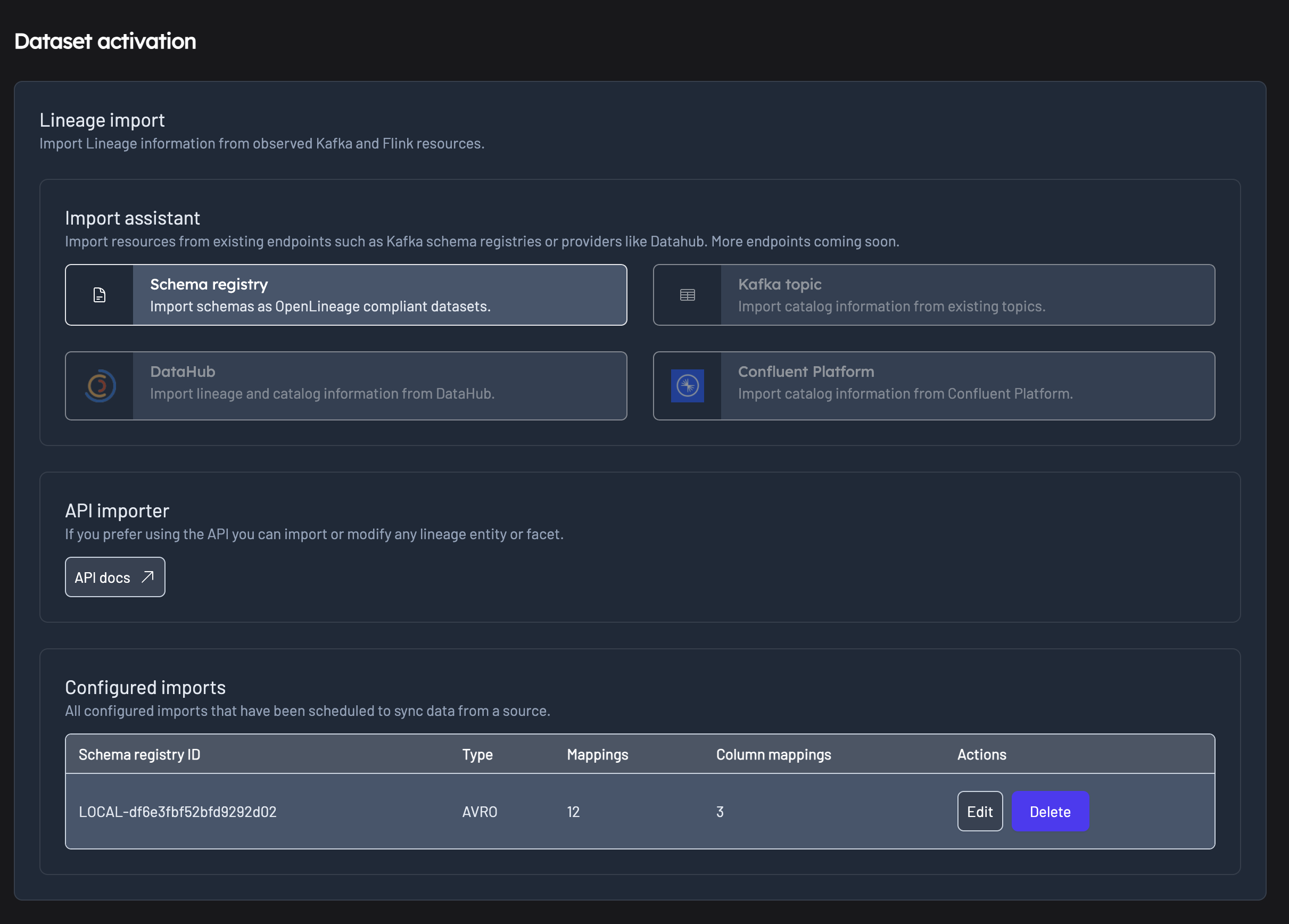
From within the Factor Platform UI, navigate to the "Lineage" page from the menu, then select the "Dataset activation" tab.
From there you can access the Dataset activation settings page where you can activate new dataset mappings or edit existing mapping configuration.
The wizard will guide you through setting up mappings for both dataset and column level lineage.
Factor Platform API
Refer to the the Factor Platform API documentation for our OpenAPI schema and more details.
SCHEMA_REGISTRY_ID=xxxx
SCHEMA_TYPE=AVRO

curl -X POST "https://com.example/lineage/v1/mappings/schema-registry/$SCHEMA_REGISTRY_ID/$SCHEMA_TYPE" \
  -H "Authorization: Bearer {token}" \
  -H "Content-Type: application/json" \
  -H "X-Tenant-ID: {tenant}" \
  -d '{
  "mappings": {
    "ops": {
      "add_ownership": {
        "expression": ".data_catalog.owner",
        "is_required": true
      },
      "add_tags": {
        "expression": ".data_catalog.tags",
        "is_required": true
      },
      "add_documentation": {
        "expression": ".data_catalog.description",
        "is_required": true
      },
      "add_resources": {
        "expression": ".data_catalog.doc_link",
        "is_required": false
      }
    },
    "custom_tags": [
      {
        "key": "Domain",
        "expression": ".data_catalog.domain",
        "is_required": true
      }
    ]
  },
  "column_mappings": {
    "custom_tags": [
      {
        "key": "Description",
        "expression": ".data_catalog.description",
        "is_required": true
      },
      {
        "key": "PII",
        "expression": ".data_catalog.pii",
        "is_required": true
      },
      {
        "key": "Classification",
        "expression": ".data_catalog.classification",
        "is_required": false
      }
    ]
  }
}'