Confluent Platform
Confluent Platform is an enterprise-grade distribution of Apache Kafka. It extends open-source Kafka with a rich set of additional components and commercial features, designed to simplify the development and management of streaming applications. This platform includes Schema Registry for schema management, ksqlDB for stream processing with SQL, and robust connectors, all tightly integrated.
This guide provides a quickstart for deploying a local Confluent Platform environment using Docker Compose, complete with Kpow for comprehensive monitoring and management.
Kpow also supports OAuth/OIDC for Authentication in Confluent Platform.
Quickstart
We will launch a complete Confluent Platform stack, including a Kafka broker, Schema Registry, Kafka Connect, and ksqldb-server, alongside an instance of Kpow. This setup provides a powerful, integrated environment for building and testing real-time data pipelines.
This guide uses the Enterprise edition of Kpow, as ksqlDB integration is not supported in the Community edition. If you are using the Community edition, any ksqlDB configurations will be ignored.
Here is a breakdown of the services defined in our docker-compose.yml file:
-
Confluent Broker (
broker)- Image:
confluentinc/cp-server:7.8.0 - Host Ports:
9092: Exposes the Kafka API to our local machine.
- Configuration:
- Mode: Runs a single Kafka node in KRaft mode, acting as both broker and controller.
- Listeners: Configured with
PLAINTEXT://broker:29092for internal communication between services andPLAINTEXT_HOST://localhost:9092for access from our host machine. - Integration: Pre-configured to work with Schema Registry and Confluent Metrics Reporter.
- Image:
-
Confluent Schema Registry (
schema-registry)- Image:
confluentinc/cp-schema-registry:7.8.0 - Host Ports:
8081: Exposes the Schema Registry API athttp://localhost:8081.
- Configuration: Connects to the Kafka broker at
broker:29092to store schemas.
- Image:
-
Confluent Kafka Connect (
connect)- Image:
confluentinc/cp-kafka-connect:7.8.0 - Host Ports:
8083: Exposes the Kafka Connect REST API athttp://localhost:8083.
- Configuration: Includes Confluent Monitoring Interceptors and connects to the broker for its operation.
- Image:
-
Confluent ksqlDB Server (
ksqldb-server)- Image:
confluentinc/cp-ksqldb-server:7.8.0 - Host Ports:
8088: Exposes the ksqlDB REST API athttp://localhost:8088.
- Configuration: Integrated with the broker, Schema Registry, and Kafka Connect, providing a SQL interface to build streaming applications.
- Image:
-
Kpow (
kpow)- Image:
factorhouse/kpow:latest - Host Ports:
3000: Exposes the Kpow web UI, which we can access athttp://localhost:3000.
- Configuration:
setup.env: Configured to connect to the entire Confluent stack: the broker, Connect, Schema Registry, and ksqlDB.- Security: Includes pre-configured JAAS and RBAC files for user authentication and role-based access control within Kpow.
- Image:
docker-compose.yml
services:
  broker:
    image: confluentinc/cp-server:7.8.0
    hostname: broker
    container_name: broker
    ports:
      - "9092:9092"
      - "9101:9101"
    environment:
      KAFKA_NODE_ID: 1
      KAFKA_LISTENER_SECURITY_PROTOCOL_MAP: "CONTROLLER:PLAINTEXT,PLAINTEXT:PLAINTEXT,PLAINTEXT_HOST:PLAINTEXT"
      KAFKA_ADVERTISED_LISTENERS: "PLAINTEXT://broker:29092,PLAINTEXT_HOST://localhost:9092"
      KAFKA_OFFSETS_TOPIC_REPLICATION_FACTOR: 1
      KAFKA_GROUP_INITIAL_REBALANCE_DELAY_MS: 0
      KAFKA_CONFLUENT_LICENSE_TOPIC_REPLICATION_FACTOR: 1
      KAFKA_CONFLUENT_BALANCER_TOPIC_REPLICATION_FACTOR: 1
      KAFKA_TRANSACTION_STATE_LOG_MIN_ISR: 1
      KAFKA_TRANSACTION_STATE_LOG_REPLICATION_FACTOR: 1
      KAFKA_JMX_PORT: 9101
      KAFKA_JMX_HOSTNAME: localhost
      KAFKA_CONFLUENT_SCHEMA_REGISTRY_URL: http://schema-registry:8081
      KAFKA_METRIC_REPORTERS: io.confluent.metrics.reporter.ConfluentMetricsReporter
      CONFLUENT_METRICS_REPORTER_BOOTSTRAP_SERVERS: broker:29092
      CONFLUENT_METRICS_REPORTER_TOPIC_REPLICAS: 1
      KAFKA_PROCESS_ROLES: "broker,controller"
      KAFKA_CONTROLLER_QUORUM_VOTERS: "1@broker:29093"
      KAFKA_LISTENERS: "PLAINTEXT://broker:29092,CONTROLLER://broker:29093,PLAINTEXT_HOST://0.0.0.0:9092"
      KAFKA_INTER_BROKER_LISTENER_NAME: "PLAINTEXT"
      KAFKA_CONTROLLER_LISTENER_NAMES: "CONTROLLER"
      KAFKA_LOG_DIRS: "/tmp/kraft-combined-logs"
      CONFLUENT_METRICS_ENABLE: "true"
      CONFLUENT_SUPPORT_CUSTOMER_ID: "anonymous"
      # Replace CLUSTER_ID with a unique base64 UUID using "bin/kafka-storage.sh random-uuid"
      # See https://docs.confluent.io/kafka/operations-tools/kafka-tools.html#kafka-storage-sh
      CLUSTER_ID: "MkU3OEVBNTcwNTJENDM2Qk"

  schema-registry:
    image: confluentinc/cp-schema-registry:7.8.0
    hostname: schema-registry
    container_name: schema-registry
    depends_on:
      - broker
    ports:
      - "8081:8081"
    environment:
      SCHEMA_REGISTRY_HOST_NAME: schema-registry
      SCHEMA_REGISTRY_KAFKASTORE_BOOTSTRAP_SERVERS: "broker:29092"
      SCHEMA_REGISTRY_LISTENERS: http://0.0.0.0:8081

  connect:
    image: confluentinc/cp-kafka-connect:7.8.0
    container_name: connect
    depends_on:
      - broker
      - schema-registry
    ports:
      - "8083:8083"
    environment:
      CONNECT_BOOTSTRAP_SERVERS: "broker:29092"
      CONNECT_REST_ADVERTISED_HOST_NAME: connect
      CONNECT_GROUP_ID: compose-connect-group
      CONNECT_CONFIG_STORAGE_TOPIC: docker-connect-configs
      CONNECT_CONFIG_STORAGE_REPLICATION_FACTOR: 1
      CONNECT_OFFSET_FLUSH_INTERVAL_MS: 10000
      CONNECT_OFFSET_STORAGE_TOPIC: docker-connect-offsets
      CONNECT_OFFSET_STORAGE_REPLICATION_FACTOR: 1
      CONNECT_STATUS_STORAGE_TOPIC: docker-connect-status
      CONNECT_STATUS_STORAGE_REPLICATION_FACTOR: 1
      CONNECT_KEY_CONVERTER: org.apache.kafka.connect.json.JsonConverter
      CONNECT_VALUE_CONVERTER: org.apache.kafka.connect.json.JsonConverter
      # CLASSPATH required due to CC-2422
      CLASSPATH: /usr/share/java/monitoring-interceptors/monitoring-interceptors-7.8.0.jar
      CONNECT_PRODUCER_INTERCEPTOR_CLASSES: "io.confluent.monitoring.clients.interceptor.MonitoringProducerInterceptor"
      CONNECT_CONSUMER_INTERCEPTOR_CLASSES: "io.confluent.monitoring.clients.interceptor.MonitoringConsumerInterceptor"
      CONNECT_PLUGIN_PATH: "/usr/share/java,/usr/share/confluent-hub-components"

  ksqldb-server:
    image: confluentinc/cp-ksqldb-server:7.8.0
    container_name: ksqldb-server
    depends_on:
      - broker
      - connect
    ports:
      - "8088:8088"
    environment:
      KSQL_CONFIG_DIR: "/etc/ksql"
      KSQL_BOOTSTRAP_SERVERS: "broker:29092"
      KSQL_HOST_NAME: ksqldb-server
      KSQL_LISTENERS: "http://0.0.0.0:8088"
      KSQL_CACHE_MAX_BYTES_BUFFERING: 0
      KSQL_KSQL_SCHEMA_REGISTRY_URL: "http://schema-registry:8081"
      KSQL_PRODUCER_INTERCEPTOR_CLASSES: "io.confluent.monitoring.clients.interceptor.MonitoringProducerInterceptor"
      KSQL_CONSUMER_INTERCEPTOR_CLASSES: "io.confluent.monitoring.clients.interceptor.MonitoringConsumerInterceptor"
      KSQL_KSQL_CONNECT_URL: "http://connect:8083"
      KSQL_KSQL_LOGGING_PROCESSING_TOPIC_REPLICATION_FACTOR: 1
      KSQL_KSQL_LOGGING_PROCESSING_TOPIC_AUTO_CREATE: "true"
      KSQL_KSQL_LOGGING_PROCESSING_STREAM_AUTO_CREATE: "true"

  kpow:
    image: factorhouse/kpow:latest
    container_name: kpow
    pull_policy: always
    restart: always
    ports:
      - "3000:3000"
    depends_on:
      - broker
      - connect
      - schema-registry
      - ksqldb-server
    env_file:
      - resources/config/setup.env
    volumes:
      - ./resources/jaas:/etc/kpow/jaas
      - ./resources/rbac:/etc/kpow/rbac
resources/config/setup.env
## AuthN + AuthZ
JAVA_TOOL_OPTIONS="-Djava.awt.headless=true -Djava.security.auth.login.config=/etc/kpow/jaas/hash-jaas.conf"
AUTH_PROVIDER_TYPE=jetty
RBAC_CONFIGURATION_FILE=/etc/kpow/rbac/hash-rbac.yml

## Kafka environments
ENVIRONMENT_NAME=CP Kafka
BOOTSTRAP=broker:29092
CONNECT_NAME=CP Kafka Connect
CONNECT_REST_URL=http://connect:8083
SCHEMA_REGISTRY_NAME=CP Schema Registry
SCHEMA_REGISTRY_URL=http://schema-registry:8081
KSQLDB_NAME=CP KSQLDB
KSQLDB_HOST=ksqldb-server
KSQLDB_PORT=8088
# Replication factor for internal Kpow topics
REPLICATION_FACTOR=1

## Your License Details
LICENSE_ID=<license-id>
LICENSE_CODE=<license-code>
LICENSEE=<licensee>
LICENSE_EXPIRY=<license-expiry>
LICENSE_SIGNATURE=<license-signature>

## Allowed Actions in Simple Access Control
# Allow users to admin panels and controls
ALLOW_KPOW_ADMIN=true
# Allow users to read topic key and value data
ALLOW_TOPIC_INSPECT=true
# Allow users to write new messages to topics
ALLOW_TOPIC_PRODUCE=true
# Allow users to create new topics
ALLOW_TOPIC_CREATE=true
# Allow users to edit topic configuration
ALLOW_TOPIC_EDIT=true
# Allow users to delete topics
ALLOW_TOPIC_DELETE=true
# Allow users to truncate topics
ALLOW_TOPIC_TRUNCATE=true
# Allow users to elect the leader replica of a topic partition
ALLOW_TOPIC_ELECT_LEADER=true
# Allow users to edit the reassignments of a topic partition
ALLOW_TOPIC_ALTER_REASSIGNMENTS=true
# Allow users to change consumer group offsets
ALLOW_GROUP_EDIT=true
# Allow users to delete consumer groups entirely
ALLOW_GROUP_DELETE=true
# Allow users to edit broker configuration
ALLOW_BROKER_EDIT=true
# Allow users to unregister brokers
ALLOW_BROKER_UNREGISTER=true
# Allow users to create and delete Kafka ACLs
ALLOW_ACL_EDIT=true
# Allow users to abort transactions and fence Kafka Producers
ALLOW_PRODUCER_EDIT=true
# Allow users to create, edit and delete Kafka Quotas
ALLOW_QUOTA_EDIT=true
# Allow users to create new schemas and subjects
ALLOW_SCHEMA_CREATE=true
# Allow users to edit schemas and subjects
ALLOW_SCHEMA_EDIT=true
# Allow users to create new connectors
ALLOW_CONNECT_CREATE=true
# Allow users to edit, pause, stop, and restart connectors and tasks
ALLOW_CONNECT_EDIT=true
# Allow users to view connect configuration and metadata (automatically applied when CONNECT_EDIT enabled)
ALLOW_CONNECT_INSPECT=true
# Allow users to invoke bulk actions
ALLOW_BULK_ACTION=true
# Allow users to execute ksqlDB SQL queries (push or pull)
ALLOW_KSQLDB_QUERY=true
# Allow users to execute ksqlDB SQL statements (eg, `CREATE_TABLE`)
ALLOW_KSQLDB_EXECUTE=true
# Allow users to terminate ksqlDB streaming push queries
ALLOW_KSQLDB_TERMINATE_QUERY=true
# Allow users to insert ksqlDB rows into source tables or streams
ALLOW_KSQLDB_INSERT=true
resources/jaas/hash-jaas.conf
kpow {
         org.eclipse.jetty.jaas.spi.PropertyFileLoginModule required
         file="/etc/kpow/jaas/hash-realm.properties";
    };
resources/jaas/hash-realm.properties
# This file defines users passwords and roles for a HashUserRealm
#
# The format is
#  <username>: <password>[,<rolename> ...]
#
# Passwords may be clear text, obfuscated or checksummed.  The class
# org.eclipse.jetty.util.security.Password should be used to generate obfuscated
# passwords or password checksums
#
# If DIGEST Authentication is used, the password must be in a recoverable
# format, either plain text or OBF:.
#
# five users [user/pass] with different roles for evaluation purposes
#
# jetty/jetty
jetty: MD5:164c88b302622e17050af52c89945d44,kafka-users,content-administrators
# admin/admin
admin: CRYPT:adpexzg3FUZAk,server-administrators,content-administrators,kafka-admins
# other/other
other: OBF:1xmk1w261u9r1w1c1xmq,kafka-admins,kafka-users
# plain/plain
plain: plain,content-administrators
# user/password
user: password,kafka-users
resources/rbac/hash-rbac.yml
admin_roles:
  - "kafka-admins"
  - "server-administrators"

authorized_roles:
  - "kafka-admins"
  - "kafka-users"
  - "server-administrators"

policies:
  - actions:
      - TOPIC_CREATE
      - TOPIC_PRODUCE
      - TOPIC_EDIT
      - TOPIC_DELETE
      - GROUP_EDIT
      - ACL_EDIT
      - BULK_ACTION
    effect: Allow
    resource:
      - cluster
      - "*"
    role: "kafka-admins"
  - actions:
      - CONNECT_CREATE
      - CONNECT_EDIT
    effect: Allow
    resource:
      - connect
      - "*"
    role: "kafka-admins"
  - actions:
      - SCHEMA_EDIT
      - SCHEMA_CREATE
    effect: Allow
    resource:
      - schema
      - "*"
    role: "kafka-admins"
  - actions:
      - BROKER_EDIT
    effect: Allow
    resource:
      - cluster
      - "*"
    role: "kafka-admins"
  - actions:
      - TOPIC_PRODUCE
      - TOPIC_EDIT
      - ACL_EDIT
    effect: Allow
    resource:
      - cluster
      - "*"
    role: "kafka-users"
  - actions:
      - CONNECT_CREATE
      - CONNECT_EDIT
    effect: Allow
    resource:
      - connect
      - "*"
    role: "kafka-users"
  - actions:
      - SCHEMA_EDIT
      - SCHEMA_CREATE
    effect: Deny
    resource:
      - schema
      - "*"
    role: "kafka-users"
  - actions:
      - TOPIC_INSPECT
    effect: Allow
    resource:
      - cluster
      - "*"
    roles: ["kafka-users", "kafka-admins"]
  - actions:
      - KSQLDB_QUERY
      - KSQLDB_EXECUTE
      - KSQLDB_TERMINATE_QUERY
      - KSQLDB_INSERT
      - BULK_ACTION
    effect: Allow
    resource:
      - ksqldb
      - "*"
    role: "kafka-admins"
To launch the entire stack, we need to ensure our directory structure matches the volume mounts in the docker-compose.yml file (resources/config, resources/jaas, resources/rbac). Then, we run the following command from the same directory as our docker-compose.yml file:
docker-compose up -d
Once the containers are running, open a web browser and go to http://localhost:3000. When prompted to log in, use the admin user with the password admin. This user has the kafka-admins role, as defined in resources/jaas/hash-realm.properties, and it grants access to all the resources covered in this guide.
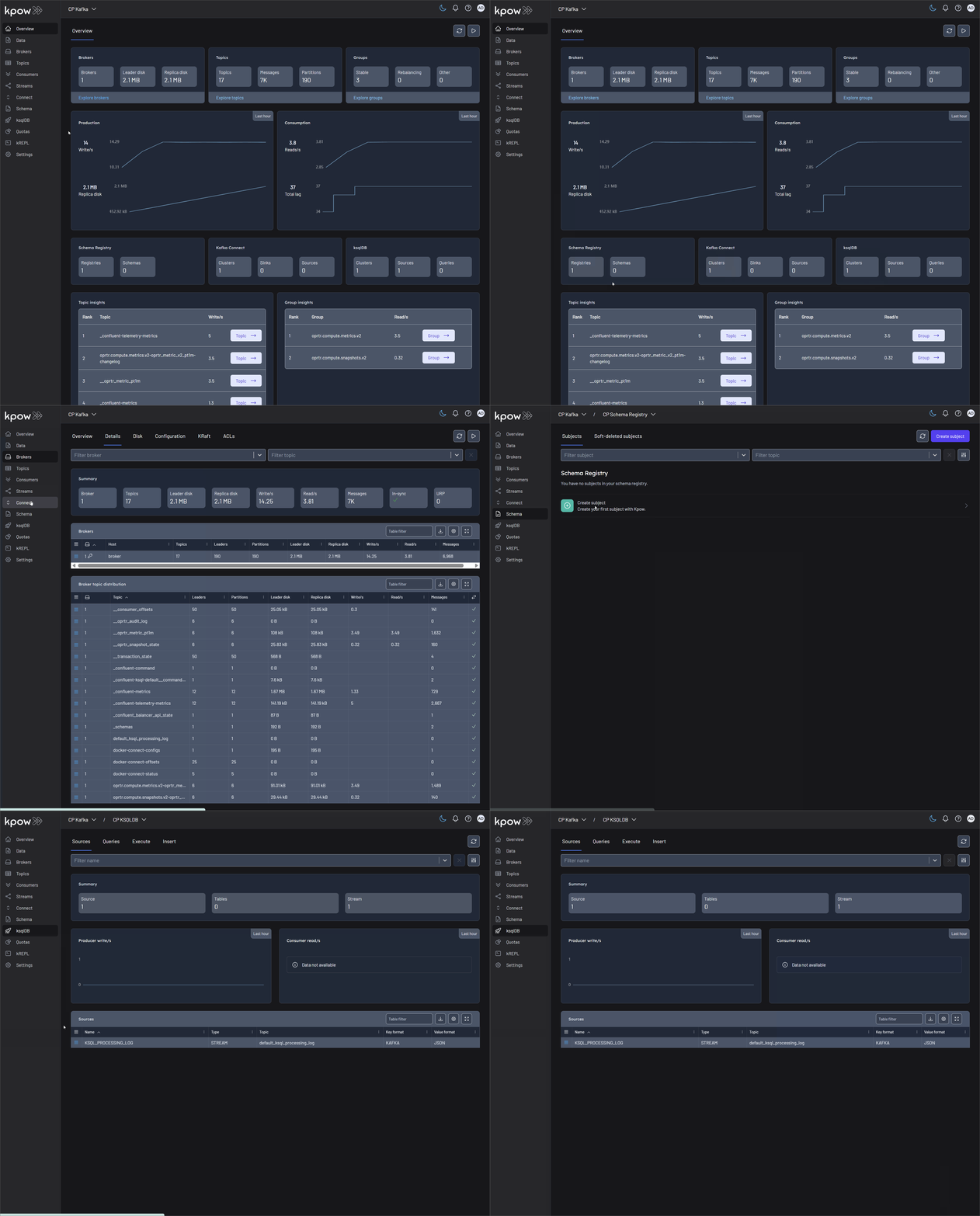
In the UI, we will find that Kpow has automatically connected to all Confluent Platform resources.