Self-managed Kafka
Opting for a self-managed Apache Kafka setup gives us complete control over our Kafka environment. This approach allows for deep customization of our cluster's configuration and is ideal for specific use cases that a managed service might not support. While it requires us to handle the operational responsibilities of managing the cluster, it can be a cost-effective solution, especially for those who already have on-premises infrastructure.
Quickstart
We will start by launching a single-node Apache Kafka cluster, a Kafka Connect instance, and a Kpow instance using Docker Compose. This provides a complete local environment for developing and testing our Kafka applications.
The Schema Registry is not included in the open source Kafka distribution and is therefore not covered in this guide. However, Kpow provides robust support for Confluent-compatible schema registries. For more information on how Kpow integrates with Confluent Schema Registry, Apicurio Registry, and Karapace, see this post.
Here is a breakdown of the services defined in the docker-compose.yml file:
-
Kafka Broker (
broker)- Image:
apache/kafka:latest - Host Ports:
9092: Exposes the Kafka API to the host machine.
- Configuration:
- Mode: Runs a single node in KRaft mode, acting as both a broker and a controller.
- Listeners: Configured with multiple listeners. The
INTERNALlistener onbroker:19092is used for communication within the Docker network (e.g., from Connect and Kpow). TheEXTERNALlistener onlocalhost:9092is for applications running on the host machine.
- Image:
-
Kafka Connect (
connect)- Image:
apache/kafka:latest - Host Ports:
8083: Exposes the Kafka Connect REST API, accessible athttp://localhost:8083.
- Configuration:
- Bootstrap Servers: The
connect-distributed.propertiesfile configures thebootstrap.serversto connect to the Kafka broker atbroker:19092. - Dependencies: Explicitly depends on the
brokerservice to ensure Kafka is available before Connect starts. - Volumes: Mounts a local
connect-distributed.propertiesfile for configuration.
- Bootstrap Servers: The
- Image:
-
Kpow (
kpow)- Image:
factorhouse/kpow:latest - Host Ports:
3000: Exposes the Kpow web UI, accessible athttp://localhost:3000.
- Configuration:
setup.env: All configuration is loaded from thesetup.envfile.BOOTSTRAP: Configured to connect to the broker atbroker:19092.CONNECT_REST_URL: Set tohttp://connect:8083to monitor and manage the Kafka Connect cluster.- Licensing: Requires your Kpow license details to be set in the
setup.envfile. - Dependencies: Explicitly depends on the
connectservice.
- Image:
docker-compose.yml
services:
  broker:
    image: apache/kafka:latest
    container_name: broker
    ports:
      - "9092:9092"
    environment:
      KAFKA_NODE_ID: 1
      KAFKA_PROCESS_ROLES: broker,controller
      KAFKA_LISTENER_SECURITY_PROTOCOL_MAP: CONTROLLER:PLAINTEXT,INTERNAL:PLAINTEXT,EXTERNAL:PLAINTEXT
      KAFKA_CONTROLLER_LISTENER_NAMES: CONTROLLER
      KAFKA_LISTENERS: INTERNAL://broker:19092,CONTROLLER://broker:9094,EXTERNAL://0.0.0.0:9092
      KAFKA_ADVERTISED_LISTENERS: INTERNAL://broker:19092,EXTERNAL://localhost:9092
      KAFKA_INTER_BROKER_LISTENER_NAME: INTERNAL
      KAFKA_CONTROLLER_QUORUM_VOTERS: 1@broker:9094
      KAFKA_OFFSETS_TOPIC_REPLICATION_FACTOR: 1
      KAFKA_TRANSACTION_STATE_LOG_REPLICATION_FACTOR: 1
      KAFKA_TRANSACTION_STATE_LOG_MIN_ISR: 1
      KAFKA_GROUP_INITIAL_REBALANCE_DELAY_MS: 0

  connect:
    image: apache/kafka:latest
    container_name: connect
    command: >
      /opt/kafka/bin/connect-distributed.sh
      /opt/kafka/config/connect-distributed.properties
    depends_on:
      - broker
    ports:
      - "8083:8083"
    volumes:
      - ./connect-distributed.properties:/opt/kafka/config/connect-distributed.properties

  kpow:
    image: factorhouse/kpow-ce:latest
    container_name: kpow-ce
    pull_policy: always
    restart: always
    ports:
      - "3000:3000"
    depends_on:
      - connect
    env_file:
      - setup.env
connect-distributed.properties
# Connect to the broker using its Docker network name and internal listener port
bootstrap.servers=broker:19092

# --- The rest of your configuration ---
rest.port=8083
rest.advertised.host.name=localhost
group.id=kafka-connect-cluster

key.converter=org.apache.kafka.connect.json.JsonConverter
value.converter=org.apache.kafka.connect.json.JsonConverter

config.storage.topic=__connect-configs
offset.storage.topic=__connect-offsets
status.storage.topic=__connect-status

config.storage.replication.factor=1
offset.storage.replication.factor=1
status.storage.replication.factor=1

# This path MUST exist for connectors to be found
plugin.path=/opt/kafka/plugins
setup.env
## Kafka environments
ENVIRONMENT_NAME=OSS Kafka
BOOTSTRAP=broker:19092
CONNECT_NAME=OSS Connect Cluster
CONNECT_REST_URL=http://connect:8083

## Your License Details
LICENSE_ID=<license-id>
LICENSE_CODE=<license-code>
LICENSEE=<licensee>
LICENSE_EXPIRY=<license-expiry>
LICENSE_SIGNATURE=<license-signature>

## Allowed Actions in Simple Access Control
# Allow users to admin panels and controls
ALLOW_KPOW_ADMIN=true
# Allow users to read topic key and value data
ALLOW_TOPIC_INSPECT=true
# Allow users to write new messages to topics
ALLOW_TOPIC_PRODUCE=true
# Allow users to create new topics
ALLOW_TOPIC_CREATE=true
# Allow users to edit topic configuration
ALLOW_TOPIC_EDIT=true
# Allow users to delete topics
ALLOW_TOPIC_DELETE=true
# Allow users to truncate topics
ALLOW_TOPIC_TRUNCATE=true
# Allow users to elect the leader replica of a topic partition
ALLOW_TOPIC_ELECT_LEADER=true
# Allow users to edit the reassignments of a topic partition
ALLOW_TOPIC_ALTER_REASSIGNMENTS=true
# Allow users to change consumer group offsets
ALLOW_GROUP_EDIT=true
# Allow users to delete consumer groups entirely
ALLOW_GROUP_DELETE=true
# Allow users to edit broker configuration
ALLOW_BROKER_EDIT=true
# Allow users to unregister brokers
ALLOW_BROKER_UNREGISTER=true
# Allow users to create and delete Kafka ACLs
ALLOW_ACL_EDIT=true
# Allow users to abort transactions and fence Kafka Producers
ALLOW_PRODUCER_EDIT=true
# Allow users to create, edit and delete Kafka Quotas
ALLOW_QUOTA_EDIT=true
# Allow users to create new schemas and subjects
ALLOW_SCHEMA_CREATE=true
# Allow users to edit schemas and subjects
ALLOW_SCHEMA_EDIT=true
# Allow users to create new connectors
ALLOW_CONNECT_CREATE=true
# Allow users to edit, pause, stop, and restart connectors and tasks
ALLOW_CONNECT_EDIT=true
# Allow users to view connect configuration and metadata (automatically applied when CONNECT_EDIT enabled)
ALLOW_CONNECT_INSPECT=true
# Allow users to invoke bulk actions
ALLOW_BULK_ACTION=true
# Allow users to execute ksqlDB SQL queries (push or pull)
ALLOW_KSQLDB_QUERY=true
# Allow users to execute ksqlDB SQL statements (eg, `CREATE_TABLE`)
ALLOW_KSQLDB_EXECUTE=true
# Allow users to terminate ksqlDB streaming push queries
ALLOW_KSQLDB_TERMINATE_QUERY=true
# Allow users to insert ksqlDB rows into source tables or streams
ALLOW_KSQLDB_INSERT=true
To launch the entire stack, we need to ensure the docker-compose.yml, connect-distributed.properties, and setup.env files are in the same directory. Then, we run the following command:
docker-compose up -d
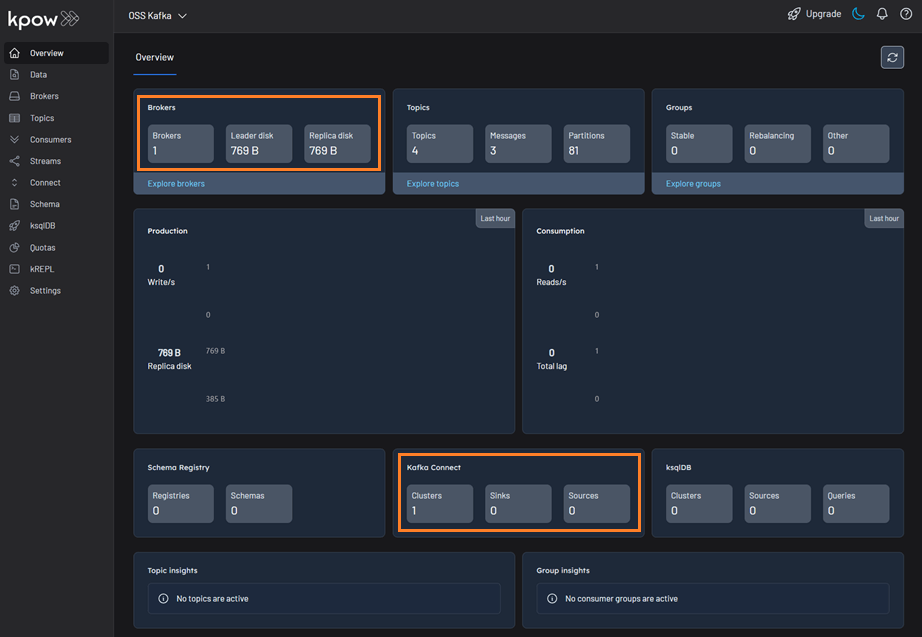
Once the containers are up and running, we can open our web browser and navigate to http://localhost:3000 to access the Kpow UI. We will find that Kpow has automatically detected and connected to our Kafka broker and Kafka Connect cluster.