StreamNative Cloud
What is StreamNative?
StreamNative delivers a fully managed, Kafka-native cloud service designed for exceptional elasticity and enterprise-grade resilience.
Kpow integrates seamlessly with StreamNative's managed Kafka brokers and Schema Registry out of the box using standard Kafka protocols.
Access control
To connect Kpow to StreamNative Cloud, you must create a service account and generate a JWT Token.
It is recommended to grant this service account the instance-owner role. Since Kpow is an engineering toolkit for managing and monitoring Kafka environments, it requires broader administrative privileges for full functionality. Once Kpow is connected, you can configure Kpow's internal authorization (via RBAC or Simple Access Control) to restrict exactly what individual engineers or teams are allowed to see and do within the UI.
Cluster authentication
StreamNative Cloud secures broker connections using TLS and authenticates via the SASL/PLAIN mechanism.
When configuring your JAAS configuration, the username is your service account email address, and the password is your JWT Token.
Configure Kpow with the following properties:
ENVIRONMENT_NAME=StreamNative Kafka
BOOTSTRAP=<BOOTSTRAP_SERVER_ADDRESS>:9093
SECURITY_PROTOCOL=SASL_SSL
SASL_MECHANISM=PLAIN
SASL_JAAS_CONFIG=org.apache.kafka.common.security.plain.PlainLoginModule required username="<SERVICE_ACCOUNT_EMAIL>" password="<JWT_TOKEN>";
Ecosystem integration
Schema Registry
Kpow fully supports the StreamNative Schema Registry, but it requires two specific configuration adjustments due to how the proxy is implemented.
- Basic Authentication: The StreamNative Schema Registry relies on Basic Authentication (
USER_INFO). It only validates the password (which must be your JWT token). The username can be any string (e.g.,any-user). - Observation Version (Critical): By default, Kpow uses an optimized "Version 2" observation strategy that hits the bulk
/schemasendpoint. StreamNative's Schema Registry proxy does not implement this bulk endpoint and will return a404 Not Founderror. You must tell Kpow to use the legacy "Version 1" strategy (/subjects) by settingSCHEMA_REGISTRY_OBSERVATION_VERSION="1".
Configure the Schema Registry with the following properties:
SCHEMA_REGISTRY_NAME=StreamNative Schema Registry
SCHEMA_REGISTRY_URL=<SCHEMA_REGISTRY_URL>
SCHEMA_REGISTRY_AUTH=USER_INFO
SCHEMA_REGISTRY_USER=any-user
SCHEMA_REGISTRY_PASSWORD=<JWT_TOKEN>
SCHEMA_REGISTRY_OBSERVATION_VERSION=1
Quickstart
You can launch a Kpow instance pre-configured for your StreamNative Cloud environment using Docker.
Provide your configuration via an environment file (e.g., setup.env containing the properties outlined above) and ensure your Kpow license file is available.
docker run -d -p 3000:3000 --name kpow \
  --env-file=./setup.env \
  --env LICENSE_ID="<LICENSE_ID>" \
  --env LICENSE_CODE="<LICENSE_CODE>" \
  --env LICENSEE="<LICENSEE>" \
  --env LICENSE_EXPIRY="<LICENSE_EXPIRY>" \
  --env LICENSE_SIGNATURE="<LICENSE_SIGNATURE>" \
  factorhouse/kpow:latest
For brevity, Kpow authorization configuration has been omitted. See Simple Access Control to enable necessary user actions.
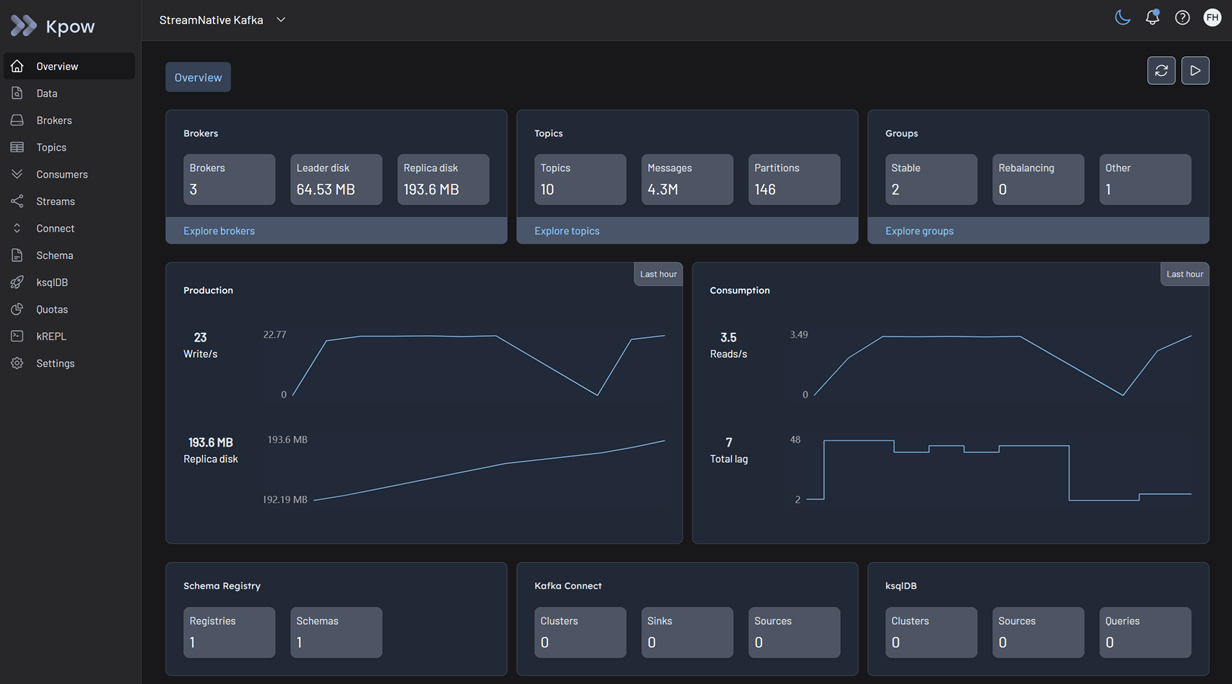
Once the container is running, Kpow will be accessible at http://localhost:3000. The user interface will confirm the successful discovery of your Kafka brokers and Schema Registry.