WarpStream
What is WarpStream?
WarpStream is a Kafka-compatible, BYOC (Bring Your Own Cloud) streaming data platform built directly on top of object storage (such as AWS S3). It delivers high durability, exceptional elasticity, and significant cost savings by eliminating the need for local disks and traditional broker replication.
Architecture Note: WarpStream operates on a split architecture: a Control Plane (managed by WarpStream) handles cluster lifecycles, IAM, and metadata, while your Data Plane (the Agents deployed in your cloud) handles the actual streaming traffic. Kafka clients (like Kpow) connect exclusively to the Data Plane endpoints exposed by your Agents or virtual clusters.
Cluster authentication
WarpStream supports multiple standard security mechanisms as described in their security documentation. When configuring your connection, ensure your BOOTSTRAP property points directly to your virtual cluster bootstrap endpoint (exposed via the data plane), rather than a Control Plane URL.
SASL/PLAIN
This is the most common mechanism when using credentials generated in the WarpStream Cloud Console. Set the following Kpow connection variables:
SECURITY_PROTOCOL=SASL_SSL
SASL_MECHANISM=PLAIN
SASL_JAAS_CONFIG=org.apache.kafka.common.security.plain.PlainLoginModule required username="<SASL_USERNAME>" password="<SASL_PASSWORD>";
SASL/SCRAM
If you have configured custom SCRAM credentials in your BYOC agent pool, configure Kpow with the following properties:
SECURITY_PROTOCOL=SASL_SSL
SASL_MECHANISM=SCRAM-SHA-256
# or SCRAM-SHA-512 depending on your agent configuration
SASL_JAAS_CONFIG=org.apache.kafka.common.security.scram.ScramLoginModule required username="<SCRAM_USERNAME>" password="<SCRAM_PASSWORD>";
SASL/OAUTHBEARER
If your WarpStream Agents are integrated with an external identity provider (such as Okta, Keycloak, or Auth0) to accept JWT access tokens, you can configure Kpow using the standard Kafka OAUTHBEARER mechanism:
SECURITY_PROTOCOL=SASL_SSL
SASL_MECHANISM=OAUTHBEARER
SASL_LOGIN_CALLBACK_HANDLER_CLASS=org.apache.kafka.common.security.oauthbearer.secured.OAuthBearerLoginCallbackHandler
SASL_JAAS_CONFIG=org.apache.kafka.common.security.oauthbearer.OAuthBearerLoginModule required \
  oauth.client.id="<OAUTH_CLIENT_ID>" \
  oauth.client.secret="<OAUTH_CLIENT_SECRET>" \
  oauth.token.endpoint.uri="<OAUTH_TOKEN_ENDPOINT_URL>";
Depending on your specific Identity Provider's requirements, you may also need to append properties like oauth.scope="<YOUR_SCOPE>" or oauth.audience="<EXPECTED_AUDIENCE>" to your JAAS configuration.
Mutual TLS (mTLS)
For bidirectional client-server verification, provide Kpow with your keystore and truststore configurations:
SECURITY_PROTOCOL=SSL
SSL_KEYSTORE_LOCATION=/path/to/keystore.jks
SSL_KEYSTORE_PASSWORD=<KEYSTORE_PASSWORD>
SSL_KEY_PASSWORD=<KEY_PASSWORD>
SSL_KEYSTORE_TYPE=PKCS12
SSL_TRUSTSTORE_LOCATION=/path/to/truststore.jks
SSL_TRUSTSTORE_PASSWORD=<TRUSTSTORE_PASSWORD>
SSL_TRUSTSTORE_TYPE=PKCS12
Access control
WarpStream utilizes two levels of access control:
- Control Plane (WarpStream Console IAM): Grants permissions for managing the cluster lifecycle, virtual clusters, agent pools, and API keys.
- Data Plane (Apache Kafka ACLs): For granular control over access to resources within a cluster, such as topics and consumer groups, WarpStream utilizes standard Kafka ACLs.
- Kpow provides robust support for Kafka ACLs out of the box. See the ACL management documentation for details.
Once Kpow is connected, you can also configure Kpow's internal authorization (via RBAC or Simple Access Control) to restrict exactly what individual engineers or teams are allowed to see and do within the UI.
Ecosystem integration
Schema Registry
Kpow fully supports WarpStream's BYOC Schema Registry. However, depending on your deployment, you may need to apply specific configuration adjustments:
- Authentication: If your Schema Registry endpoint is secured, WarpStream typically relies on Basic Authentication (
USER_INFO). - Observation Version: By default, Kpow uses an optimized "Version 2" observation strategy that queries the bulk schema listing endpoint (
/schemas). Depending on your WarpStream BYOC version and deployment, this bulk endpoint may not be implemented (which will return a404 Not Founderror in Kpow's logs). If you experience this, you may need to instruct Kpow to fall back to the legacy "Version 1" strategy (/subjects) by settingSCHEMA_REGISTRY_OBSERVATION_VERSION="1". See the Schema Registry configuration docs for more details.
Managed Data Pipelines
WarpStream's "Managed Data Pipelines" is not currently supported by Kpow.
WarpStream specifics & limitations
Internal topic configuration
Because WarpStream's diskless architecture writes directly to object storage rather than utilizing traditional broker replication, the replication factor acts as a logical durability configuration interpreted by the system, rather than physically enforced broker replication. You must configure Kpow to use REPLICATION_FACTOR="1".
Additionally, setting NUM_PARTITIONS="1" is highly recommended. In WarpStream, partition counts affect compute parallelism, fanout, and logical partitioning behavior. Keeping the partition count to 1 for Kpow's internal topics prevents unnecessary compute overhead and conserves your cluster's logical partition limits.
Quickstart
This command starts a Kpow container configured to connect to a secure WarpStream Virtual Cluster using SASL/PLAIN authentication, alongside its Schema Registry.
docker run -d -p 3000:3000 --name kpow \
  --env ENVIRONMENT_NAME="WarpStream Kafka" \
  --env BOOTSTRAP="<WARPSTREAM_VIRTUAL_CLUSTER_BOOTSTRAP_URL>" \
  --env SECURITY_PROTOCOL="SASL_SSL" \
  --env SASL_MECHANISM="PLAIN" \
  --env SASL_JAAS_CONFIG='org.apache.kafka.common.security.plain.PlainLoginModule required username="<SASL_USERNAME>" password="<SASL_PASSWORD>";' \
  --env REPLICATION_FACTOR="1" \
  --env NUM_PARTITIONS="1" \
  --env SCHEMA_REGISTRY_NAME="WarpStream Schema Registry" \
  --env SCHEMA_REGISTRY_URL="<SCHEMA_REGISTRY_URL>" \
  --env SCHEMA_REGISTRY_AUTH="USER_INFO" \
  --env SCHEMA_REGISTRY_USER="<SCHEMA_USERNAME>" \
  --env SCHEMA_REGISTRY_PASSWORD="<SCHEMA_PASSWORD>" \
  --env SCHEMA_REGISTRY_OBSERVATION_VERSION="1" \
  --env LICENSE_ID="<LICENSE_ID>" \
  --env LICENSE_CODE="<LICENSE_CODE>" \
  --env LICENSEE="<LICENSEE>" \
  --env LICENSE_EXPIRY="<LICENSE_EXPIRY>" \
  --env LICENSE_SIGNATURE="<LICENSE_SIGNATURE>" \
  factorhouse/kpow:latest
For brevity, Kpow authorization configuration has been omitted. See Simple Access Control to enable necessary user actions.
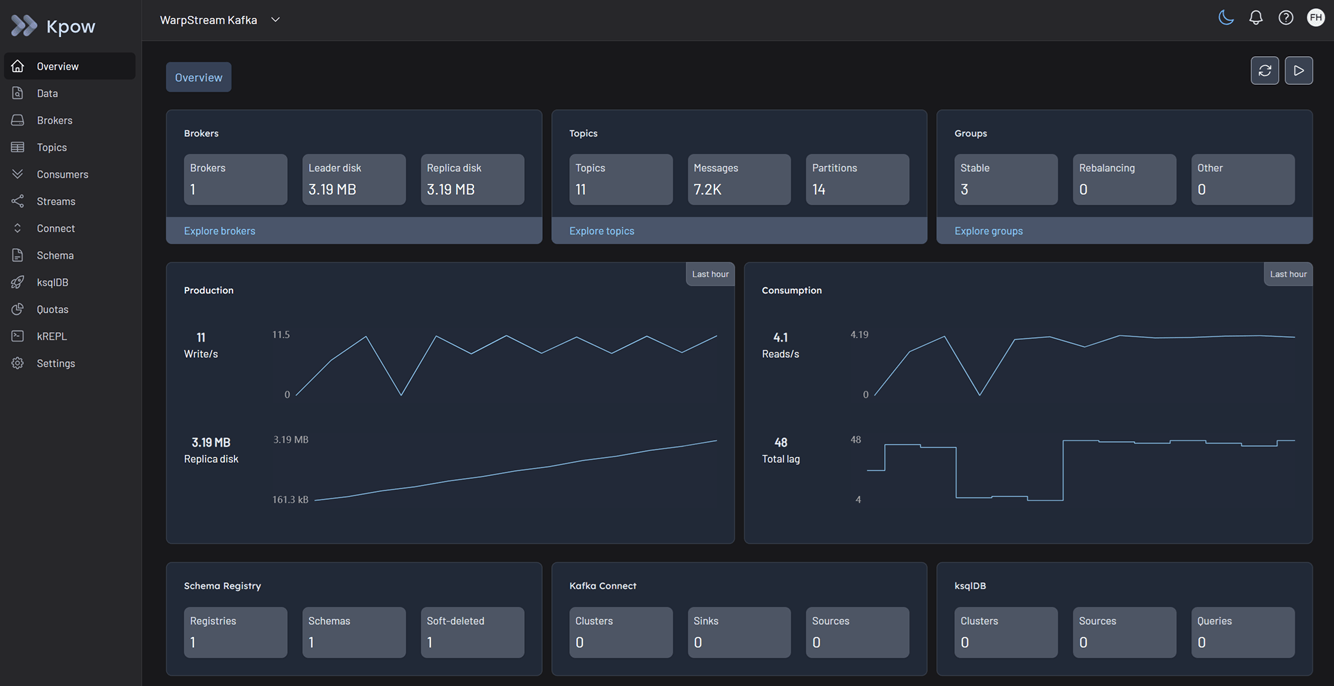
Once the container is running, navigate to http://localhost:3000 to access the Kpow UI.